
Clean Messy CSV & Excel Datasets: Profile Stats, Remove Duplicates, Trim & Sort
A fast 4-step workflow to profile column fill rates, find duplicate rows, trim trailing spaces, normalize text casing, sort cleanly, and export clean spreadsheets in your browser.
Interactive Tool Included
Skip manual formulas or run this workflow directly on your file in local browser memory.
Quick Steps Overview
- 1
Profile every column first with Column Stats
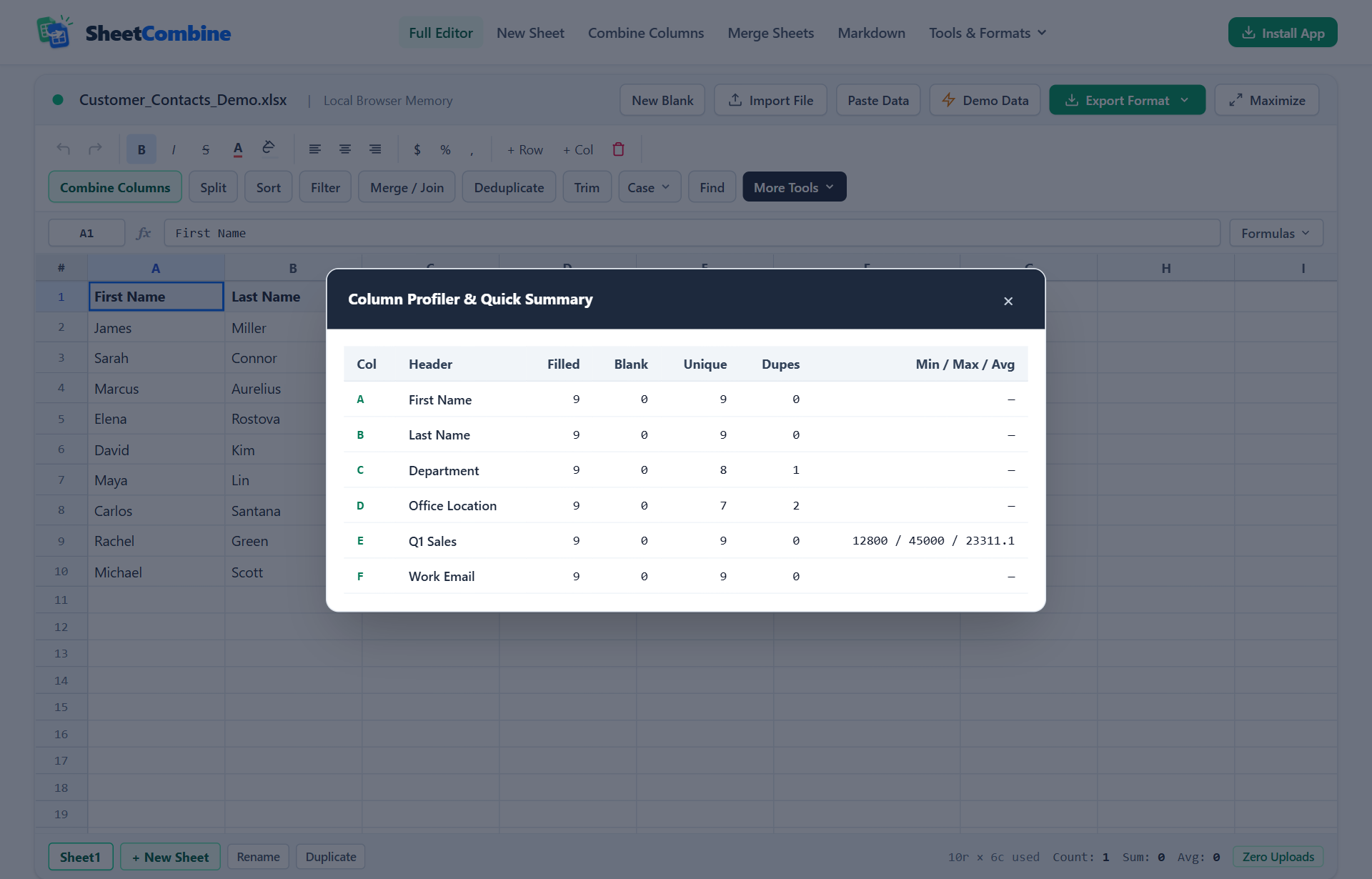
Click More Tools -> Column Stats to inspect Filled vs Blank counts, Unique values, Duplicate counts, and Min/Max/Avg across numeric columns.
- 2
Trim whitespace and normalize text casing
Click Trim to strip leading, trailing, and collapsed spaces so values like "Austin, TX " merge cleanly, then standardize Case (UPPERCASE, lowercase, Title Case).
- 3
Remove Duplicates by all columns or key IDs
Run Deduplicate to eliminate exact duplicate records or deduplicate by specific email/SKU columns.
- 4
Sort, Filter, or Transpose before export
Sort alphabetically/numerically, filter matching rows, or Transpose wide tables cleanly before downloading styled .xlsx, .csv, or .tsv.
Deleting duplicates straight off a raw CSV import often misses near-duplicate rows caused by extra trailing spaces ("Maya Lin " vs "Maya Lin") or mixed casing. Running cleanup in a strict order — Profile → Trim → Standardize Case → Deduplicate → Sort — catches hidden inconsistencies in under two minutes with zero formulas left behind.
Step 1: Audit Every Column Before Changing Data
Blindly transforming 500 rows makes it hard to verify what changed. In SheetCombine, click More Tools → Column Stats (or use the status bar summary across any highlighted range) to measure:
- Filled & Blank counts: Reveals missing emails, empty prices, or imported footer rows that need filtering out.
- Unique vs Dupes: Quickly shows whether an ID or Email column genuinely has unique keys before running a VLOOKUP sheet join. Notice above how
Departmentreports1repeated department andOffice Locationshows2repeated cities across 9 rows. - Min / Max / Avg: Instantly surfaces negative mistakes or broken decimals in price, stock, or sales columns (
12800 / 45000 / 23311.1).
Step 2: Trim Extra Whitespace & Fix Inconsistent Casing
Manual Excel formulas handle whitespace with =TRIM(PROPER(A2)), which fixes leading, trailing, and double internal spaces while normalizing casing into Title Case. Remember to copy and Paste Values after running helper formulas in desktop Excel.
In SheetCombine, click Trim directly in the toolbar to strip leading, trailing, and double spaces in-place across the whole worksheet or selected range, then open Case to switch columns uniformly to Title Case, UPPERCASE, or lowercase (essential for matching email addresses and SKU slugs).
Step 3: Remove Duplicate Rows Safely
- Open the Remove Duplicates tool or click Deduplicate in the toolbar.
- Choose whether a row counts as duplicate only when every column matches, or based on a single unique identifier column (such as
Work EmailorSKU). - SheetCombine retains the first matching row, strips later duplicates in order, and displays the exact count removed so you can hit
Ctrl+Z(Undo) immediately if needed.
Step 4: Sort, Filter, Split, or Transpose Before Export
| Task | Desktop Excel Shortcut | SheetCombine Tool |
|---|---|---|
| Pin headers & sort A-Z or 0-9 | Data → Sort (verify "My data has headers") | Sort & Filter |
| Hide non-matching records | Ctrl+Shift+L AutoFilter | Filter rows by condition |
Break City, State into 2 columns | Data → Text to Columns | Split Columns |
| Flip rows into columns | Copy → Paste Special → Transpose | Transpose Table |
Run It Yourself — Zero Server Uploads
Ready to process your own workbook?
Every transform runs in your local browser memory. Paste data, import .xlsx / .csv / .md, apply styles, and export clean results immediately.
Frequently Asked Questions
Why should I Trim whitespace BEFORE clicking Remove Duplicates?▼
To a strict comparison, "james@northstar.io" and "james@northstar.io " (with a trailing space) look like two distinct strings, so deduplication leaves both behind. Running Trim first ensures stray spaces match cleanly before deduplicating.
What does Column Profiler & Quick Summary calculate?▼
For every column in the active worksheet, Column Profiler displays Filled count, Blank count, Unique count, Duplicate value count, and numeric Min / Max / Avg statistics — letting you catch missing values or outliers immediately.
Can I remove duplicates based only on Email or Order ID instead of matching the whole row?▼
Yes. In desktop Excel and SheetCombine Deduplicate, you can choose specific key columns (for example Email) or match across the entire row depending on whether partial duplicate entries should keep the first occurrence.
Does sorting keep header row 1 pinned at the top?▼
Yes. Row 1 headers stay anchored when using SheetCombine Sort so column names never accidentally get sorted alphabetically down into your rows.
More Spreadsheet Guides
View All Guides →Combine Two Columns in Excel & CSV
Combine normalized text columns cleanly after trimming spaces and duplicates.
Combine & MergeMerge Excel Sheets & Run VLOOKUP Without Formulas
Verify lookup key uniqueness first, then run formula-free sheet joins.
Format ConversionCSV vs TSV vs JSON & SQL Export Guide
Ship cleaned datasets cleanly as TSV, JSONL, SQL scripts, or styled XLSX.
