
CSV vs TSV vs JSON vs SQL: Pick the Right Spreadsheet Export Format
Compare CSV, TSV, JSON, JSONL, YAML, and SQL INSERT exports with real delimiter pitfalls, character escaping rules, and instant browser conversion tools.
Interactive Tool Included
Skip manual formulas or run this workflow directly on your file in local browser memory.
Quick Steps Overview
- 1
Open your workbook or paste structured data
Import .xlsx, .csv, .tsv, Markdown, or JSON into SheetCombine. Everything parses in local browser memory with zero uploads.
- 2
Check columns and types in the grid
Trim extra spaces, remove blank columns, and confirm row 1 holds clean header names (helpful for JSON keys and SQL columns).
- 3
Open Export Format for instant file download
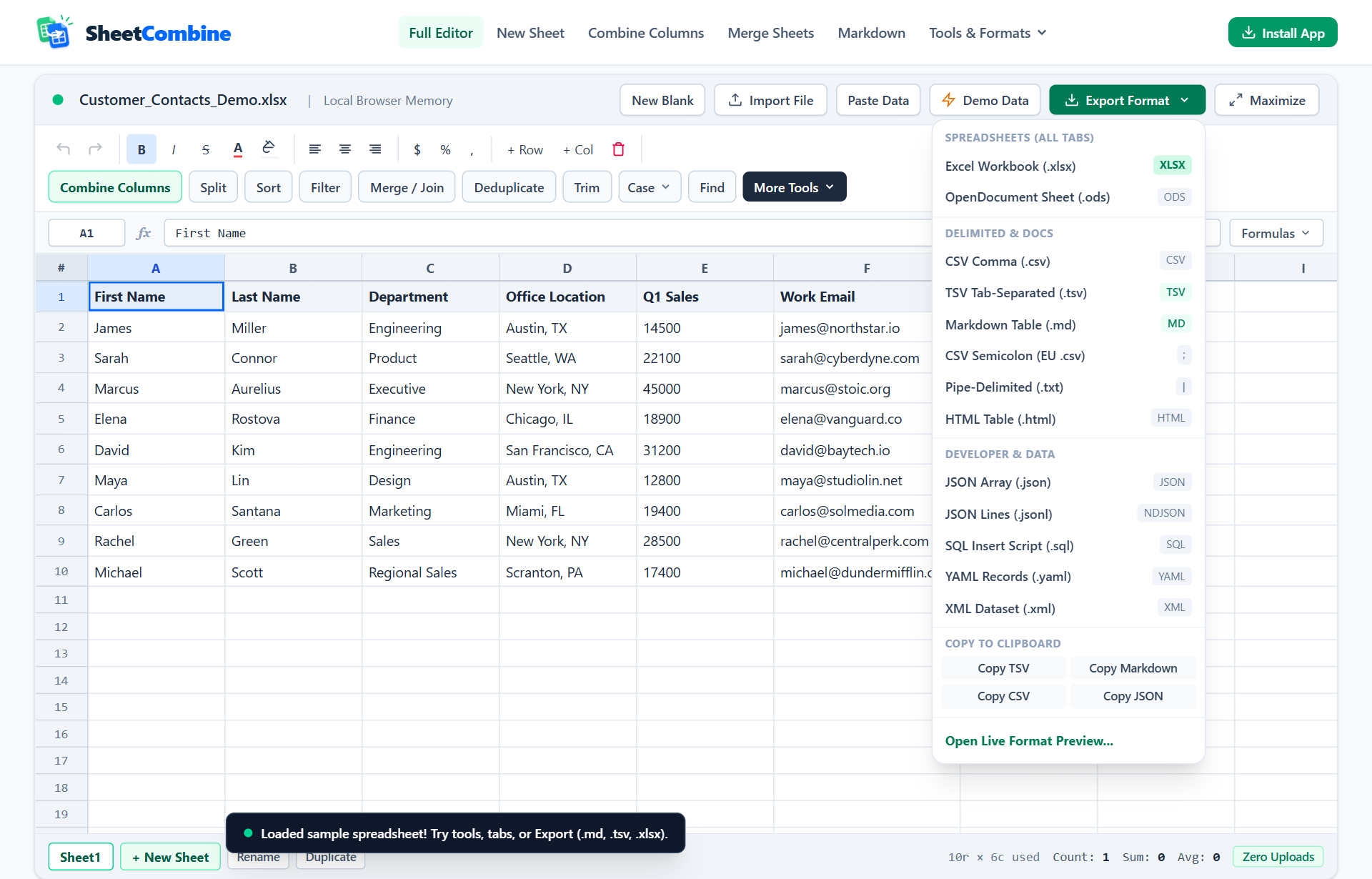
Click Export Format in the green bar to download styled .xlsx, .csv, .tsv, .md, .html, .json, .jsonl, .yaml, or .sql directly.
- 4
Or inspect and copy live text in Format Preview
Click Preview / Copy All Formats to switch between SQL CREATE + INSERT, TSV, Markdown, JSON, JSONL, and YAML before copying.
Picking the wrong text export forces manual cleanup later: commas inside city fields shift columns when opened casually, plain CSV strips out colored headers, and desktop Excel cannot write JSONL or SQL INSERT statements natively. Match your destination below, then download or preview clean output without writing custom Python scripts.
Quick Format Selection Matrix
| Format | Extension | Preserves Types / Styles? | Best Real-World Use |
|---|---|---|---|
| Excel Workbook | .xlsx | Multi-sheet + fills, bold, fonts | Finance reports, client handoffs, styled tables |
| CSV | .csv | Plain text (quotes wrap commas) | SaaS CRM uploads, Stripe/Shopify imports |
| TSV | .tsv | Plain text (tabs separate fields) | Copy/paste to Sheets, psql \copy, R & Python |
| JSON | .json | Strings, numbers, booleans | Frontend mock data, REST APIs, Node apps |
| JSONL / NDJSON | .jsonl | 1 valid JSON object per line | BigQuery loads, log pipelines, LLM eval files |
| SQL Script | .sql | Schema DDL + escaped VALUES | PostgreSQL, SQLite, DuckDB table seeding |
| Markdown / YAML | .md / .yaml | Readable structured docs | GitHub READMEs, Astro/Hugo frontmatter & CI configs |
CSV vs TSV: When Commas Cause Silent Column Shifts
Comma-separated files work well until fields contain "Austin, TX" or "$1,450.00". Any strict RFC 4180 parser handles quoted commas fine, yet naive .split(",") scripts, quick regexes, and older importers break mid-cell and push every remaining column right by one slot.
Switching to Tab-Separated Values (.tsv) eliminates comma collisions cleanly because address strings and numbers almost never contain tab characters. TSV is also the native clipboard format Excel and Google Sheets expect when pasting multi-column ranges.
Generating Clean SQL Scripts & Developer Exports Without Boilerplate
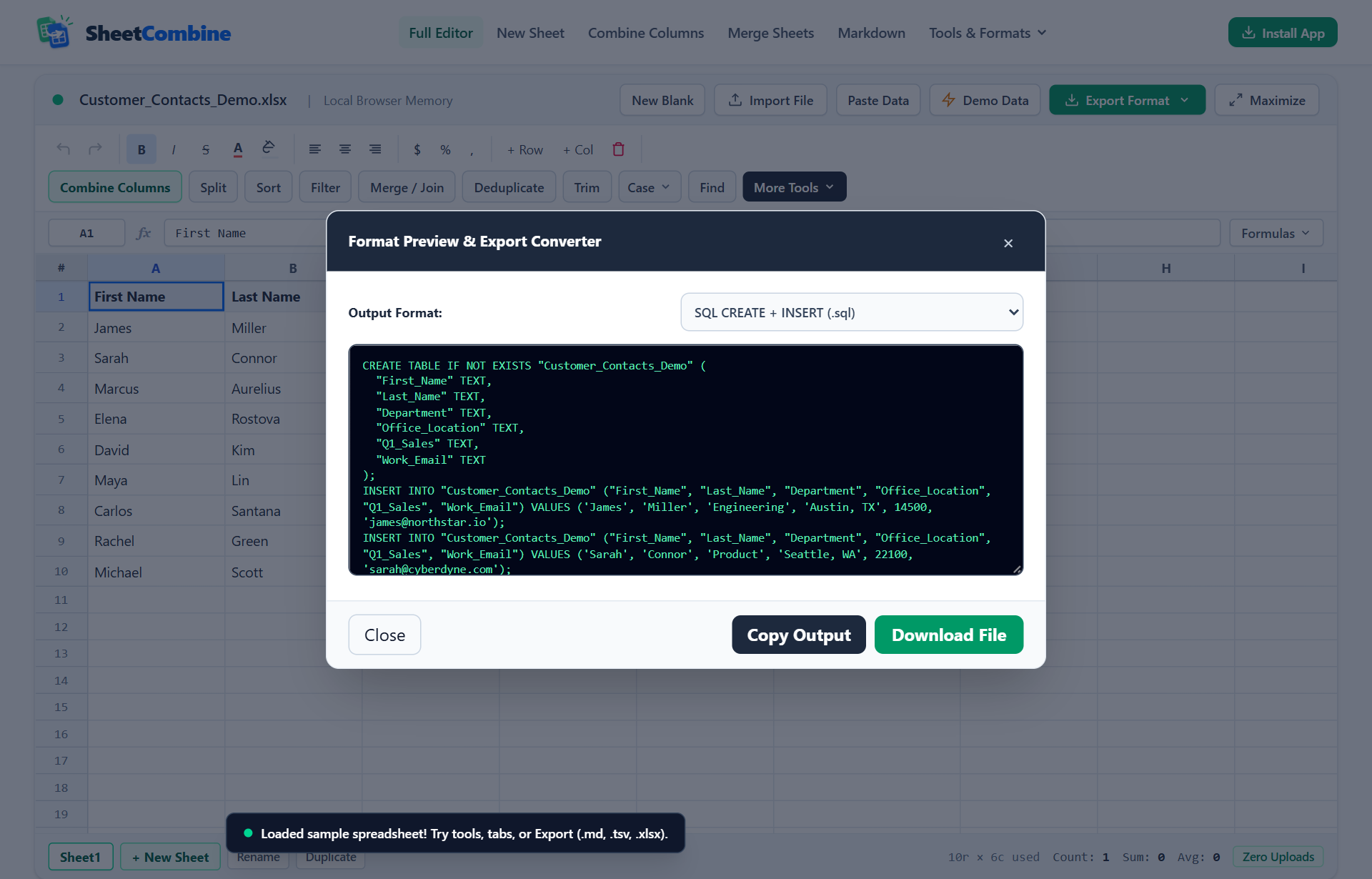
Instead of loading pandas just to turn a 40-row lookup CSV into seed queries for Postgres or SQLite, open Format Preview & Export Converter inside SheetCombine:
- Open CSV to JSON / YAML / SQL or load your sheet in the full editor.
- Confirm Row 1 contains clean column headers (spaces like
Office Locationautomatically become safe SQL identifiers such as"Office_Location"). - Click Export Format → Preview / Copy All Formats to inspect the exact
SQL,JSON,JSONL,YAML,TSV, orHTMLoutput before saving. - Click Copy Output for your SQL console or Download File to write the file locally.
Excel (.xlsx) vs CSV: When to Keep Styles
Plain .csv and .tsv files discard background fills, bold fonts, text colors, and secondary worksheet tabs on save. If your team color-codes status columns or needs multiple tabs in one file, always download via Styled Workbook (.xlsx). Check our multi-select XLSX styling guide to see how SheetCombine writes cell styles directly into the exported spreadsheet.
Run It Yourself — Zero Server Uploads
Ready to process your own workbook?
Every transform runs in your local browser memory. Paste data, import .xlsx / .csv / .md, apply styles, and export clean results immediately.
Frequently Asked Questions
When should I export TSV instead of CSV?▼
Choose TSV (tab-separated values) whenever cells contain frequent commas, such as "Austin, TX", company legal names, or European decimals (12,50), or when importing into PostgreSQL COPY, R, pandas, or bioinformatics pipelines.
What is the difference between JSON and JSONL?▼
Standard JSON wraps all rows inside one outer array ([{...}, {...}]), ideal for small REST payloads and config files. JSONL (Newline-Delimited JSON) writes one compact JSON object per line with no surrounding brackets, making it ideal for BigQuery loads, log streaming, and LLM training datasets.
How does SheetCombine SQL export format table and column names?▼
SQL export sanitizes spaces into underscores (such as First_Name and Last_Name), outputs a portable CREATE TABLE IF NOT EXISTS statement, and formats numeric literals separately from single-quoted escaped strings.
Why does CSV lose colors, bold headers, and column widths?▼
CSV and TSV are strictly plain-text formats with zero styling metadata. Whenever visual formatting, fills, or font colors matter, export as Styled Workbook (.xlsx) instead.
More Spreadsheet Guides
View All Guides →Convert Excel & CSV to Markdown Tables
Turn grid rows into GitHub pipe tables or paste Markdown back into editable sheets.
Formatting & UXStyle Multi-Selected Cells & Keep Colors in XLSX
Apply fills and fonts across non-adjacent ranges and retain styling on XLSX export.
Data CleaningAudit, Deduplicate, Sort & Clean Messy CSV Data
Spot blank rows, duplicates, and whitespace errors before running SQL or JSON exports.
