
Convert Excel & CSV into Clean Markdown Tables — and Import Markdown Back
Turn spreadsheet columns and CSV exports into aligned GitHub Flavored Markdown pipe tables for READMEs and docs, or paste any Markdown table straight back into editable Excel cells.
Interactive Tool Included
Skip manual formulas or run this workflow directly on your file in local browser memory.
Quick Steps Overview
- 1
Load spreadsheet or CSV rows
Paste directly from Excel/Google Sheets, import a .xlsx or .csv file, or paste existing Markdown into Paste Data.
- 2
Edit, trim, or sort columns first
Clean headers, combine or split fields, or run quick column formatting right inside the grid before exporting.
- 3
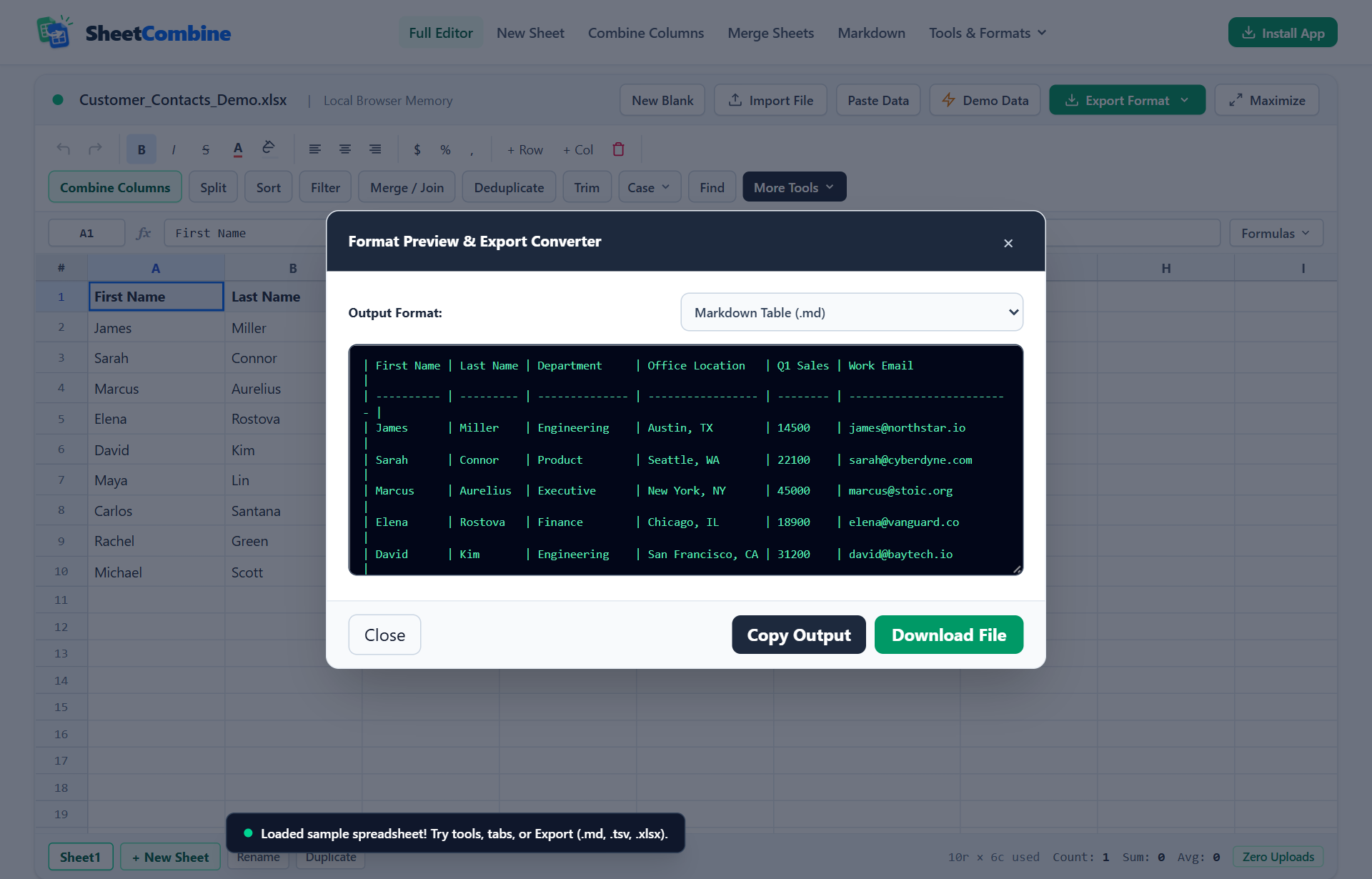
Open Export Format & Preview
Click Export Format -> Preview / Copy All Formats (JSON, YAML, SQL, MD) and select Markdown Table (.md) in the Format Preview dialog.
- 4
Copy Markdown or download .md file
Copy the aligned pipe table directly to your clipboard for GitHub, Notion, or Hugo/Astro docs, or click Download File to save a .md file.
GitHub Flavored Markdown tables require pipe characters (|) between columns plus a dashed header divider line on row two (| --- | --- |). Pasting directly out of Excel gives you tab-delimited text that renders as plain lines. With SheetCombine, you can convert any workbook range into padded, numeric-aligned Markdown in two clicks — and paste Markdown tables straight back into grid cells whenever docs change.
Anatomy of a Valid GitHub Flavored Markdown Table
Every clean Markdown pipe table has three parts: a header row, a separator row controlling column alignment, and data rows. Notice how colons set alignment on numeric columns:
| SKU   | Product Name  | Stock | Unit Price |
| ---   | ---           |  ---: |       ---: |
| A-101 | Steel Bracket |    42 |      19.50 |
| A-102 | Copper Valve | 18 | 34.00 |---or:---aligns the column left (standard for text labels and SKUs).---:aligns numbers and currency right so decimal points stay readable in raw diffs.:---:centers short badges or flags likeYes / No.
Step-by-Step: Spreadsheet to Markdown (.md)
- Open the Markdown Table Generator and load your data via Import File (
.xlsx,.csv,.tsv) or Paste Data. - Optional cleanup: delete extra helper columns or sort rows before exporting so readers only see relevant columns.
- Click the green Export Format button in the top bar. You can either click Markdown Table (.md) for an immediate file download, or click Preview / Copy All Formats to inspect and copy the Markdown text directly onto your clipboard.
- Paste the copied block into GitHub issues, pull requests, Notion, Obsidian, or Markdown docs.
Round-Trip Editing: Paste Markdown Tables Back Into Excel
Developers often receive data tables already locked inside documentation or LLM responses — and turning those pipes back into clean Excel columns by hand is tedious.
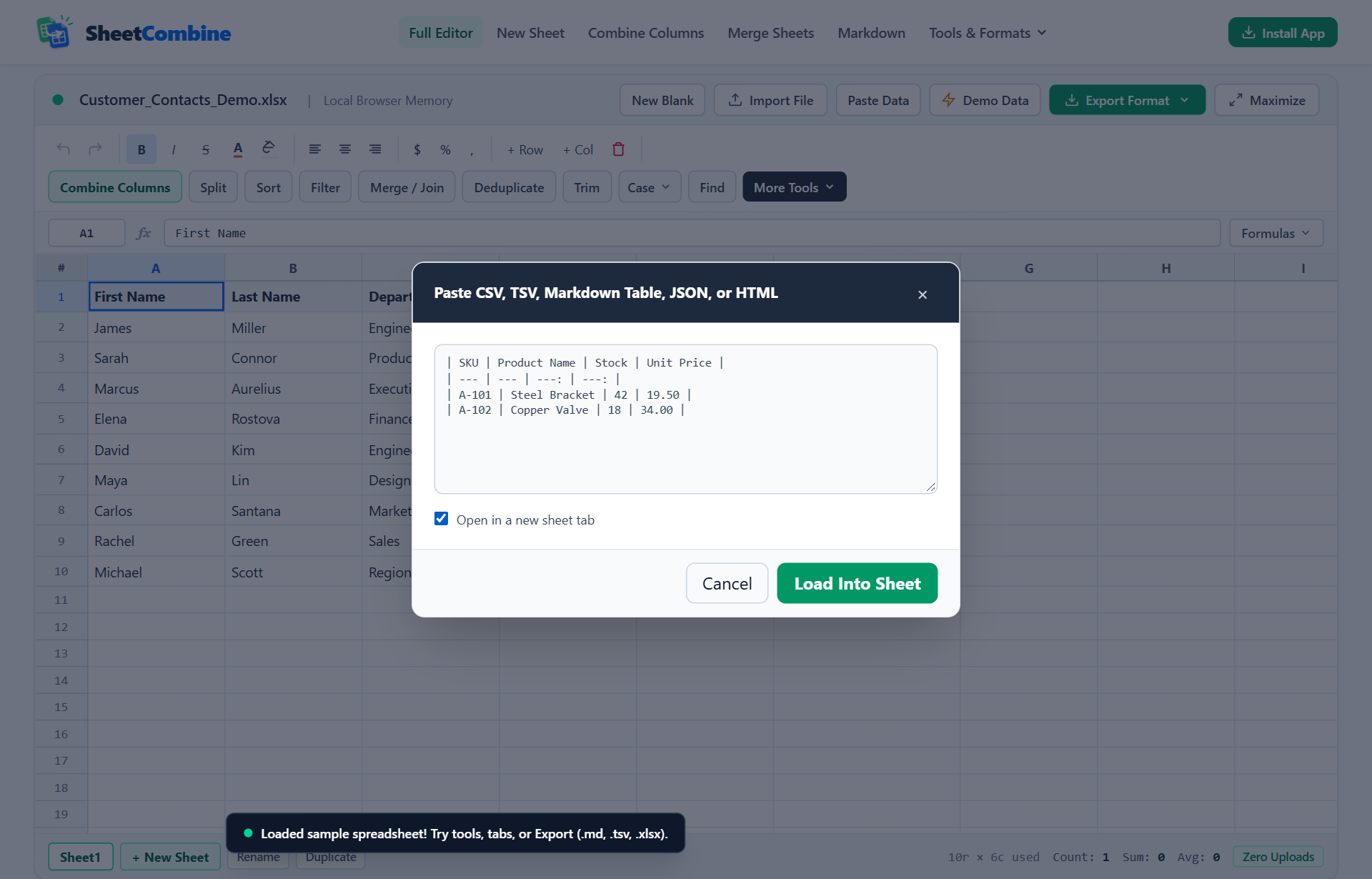
- Click Paste Data in the SheetCombine top toolbar.
- Paste the raw Markdown table block into the text box (the parser automatically ignores the
| --- |alignment row and trims cell padding). - Keep Open in a new sheet tab checked if you want to compare or join it against another sheet, then click Load Into Sheet.
- Edit cells, apply formatting, and export directly to
.xlsx,.csv, or updated Markdown.
Formatting Tips for Wide Tables in Docs
- Keep rendered docs under 6 columns: Markdown tables wrap awkwardly on narrow mobile screens. Before exporting, use Combine Columns to pair fields like
CityandStateinto one compactLocationcolumn. - Avoid multiline breaks inside cells: Literal newlines split a single Markdown row across two lines and break rendering. Replace line breaks with spaces or commas before export.
- Escape literal pipe characters: Code snippets containing
A | Binside cells need escaping (A \| B), which SheetCombine applies automatically during export.
Run It Yourself — Zero Server Uploads
Ready to process your own workbook?
Every transform runs in your local browser memory. Paste data, import .xlsx / .csv / .md, apply styles, and export clean results immediately.
Frequently Asked Questions
Why does copying from Excel into a README create tabs instead of a Markdown table?▼
Excel puts tab-separated text (TSV) and HTML onto your system clipboard, not pipe characters (|). Markdown renderers on GitHub, GitLab, and static site builders require an explicit header separator row like | --- | --- | to recognize a table.
How does SheetCombine detect right alignment in Markdown tables?▼
When exporting Markdown (.md), numeric columns like prices, quantities, or totals get automatic right-alignment colons (---:) in the separator row while text columns keep clean left alignment (---).
Can I convert an existing Markdown table back into Excel or CSV?▼
Yes. Click Paste Data in the SheetCombine toolbar, paste your raw Markdown pipe table text, and click Load Into Sheet. SheetCombine strips pipe separators and header divider rows cleanly into editable rows that you can re-export as .xlsx or .csv.
What happens if a cell contains a pipe character (|) inside Markdown?▼
Unescaped pipe characters break Markdown table columns. Clean converters escape embedded pipes with \| automatically before outputting the table.
More Spreadsheet Guides
View All Guides →CSV vs TSV vs JSON, YAML & SQL Export Guide
Pick the best text format for Git repos, databases, APIs, and Excel handoffs.
Combine & SplitCombine Two Columns Without Formula Errors
Merge columns cleanly before generating concise documentation tables.
Formatting & UXStyle Multi-Selected Cells & Keep Colors in XLSX
Preserve cell fills, fonts, and number formats when sharing Excel files.
